on-call · rosters · escalation policies

At 3 AM, one phone rings. The right one.

Build the roster, attach an escalation policy, and let AlertKick page the person who is actually on call - climbing to the next one until somebody acknowledges. Everyone else sleeps.

Priced per server, never per engineer - your whole team is included on every plan.
Free plan · no card · commercial use allowed

escalation policy · critical_alerts armed
Alert · critical 02:14

Disk 92% on prod-web-1

L1 primary on-call no ack
L2 backup on-call acknowledged
L3 #infra-alerts not needed

acknowledged 02:20 · escalation stopped

Two people were paged in six minutes. Nobody off duty was woken, and the policy stopped the moment someone took it.

roster: daily_oncall 2 of 3 levels used

already have monitoring?

Point your existing alerts at it.

You do not have to replace anything to fix on-call. Send alerts in over a webhook and AlertKick handles the rota, the paging, and the escalation from there.

your existing alerts AlertKick six ways to reach them on call Prometheus Grafana Datadog CloudWatch Zabbix Nagios Icinga2 Webhook roster + escalation policy Slack Telegram WhatsApp SMS Email Mobile push the engineer on call tonight
Whatever raises the alert, one roster and one escalation policy decide who hears about it - and on which channel.

rosters and schedules

The rota lives in the product, not a spreadsheet.

Build a rotation once - daily, weekly, bi-weekly, or a custom cadence - and it keeps turning. Everyone can see who is on call now, who is next, and when their own turn comes.

roster daily_oncall · Europe/London on call now: Rio until Fri 09:00

primary

Ada
Rio
Kai

backup

Kai
Ada
Rio

Thu-Fri backup is an override - the underlying rotation is untouched and resumes on Saturday.

Rotations that keep turning

Set the members, the order, and the handover time. Everyone takes a fair share and the schedule never needs re-typing.

Overrides for real life

Holidays, sick days, and swaps are a date range on top of the rota. The original rotation stays intact underneath.

A roster per team

Platform, database, and application on-call can each have their own rota, and escalation policies pick the one that fits the alert.

escalation policies

It keeps climbing until someone answers.

A policy is a list of levels. Each one names who to reach, on which channel, and how long to wait before giving up on them. Acknowledge at any level and the whole thing stops.

  • A different channel per level - Slack for a warning, SMS and push for a critical
  • Levels can target a person, a whole roster, or a channel
  • Per-level wait times, so a critical alert climbs faster than a warning
  • A catch-all last step, so nothing ever ends in silence
See alerting and escalation in detail

escalation policy · critical_alerts

  1. Start

  2. 1

    Notify primary on-call

    push + SMS · wait 5 minutes

  3. 2

    Escalate to roster daily_oncall

    SMS + Telegram · wait 10 minutes

  4. 3

    Escalate to engineering lead

    WhatsApp + SMS · wait 10 minutes

  5. 4

    Catch-all: #infra-alerts

    slack · policy ends

  6. Stop

where the page lands

Wherever your team already is - and in a pocket.

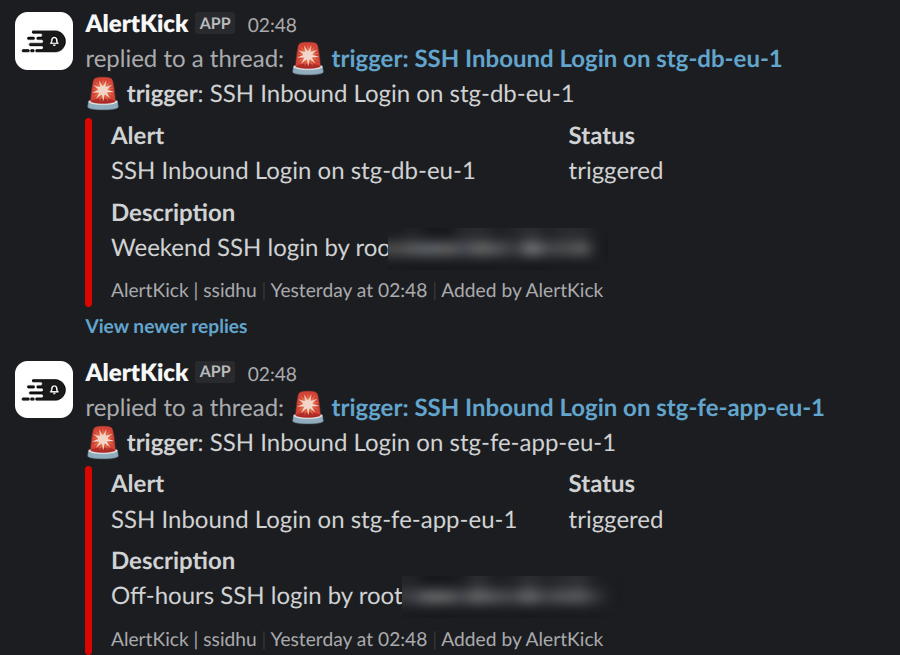
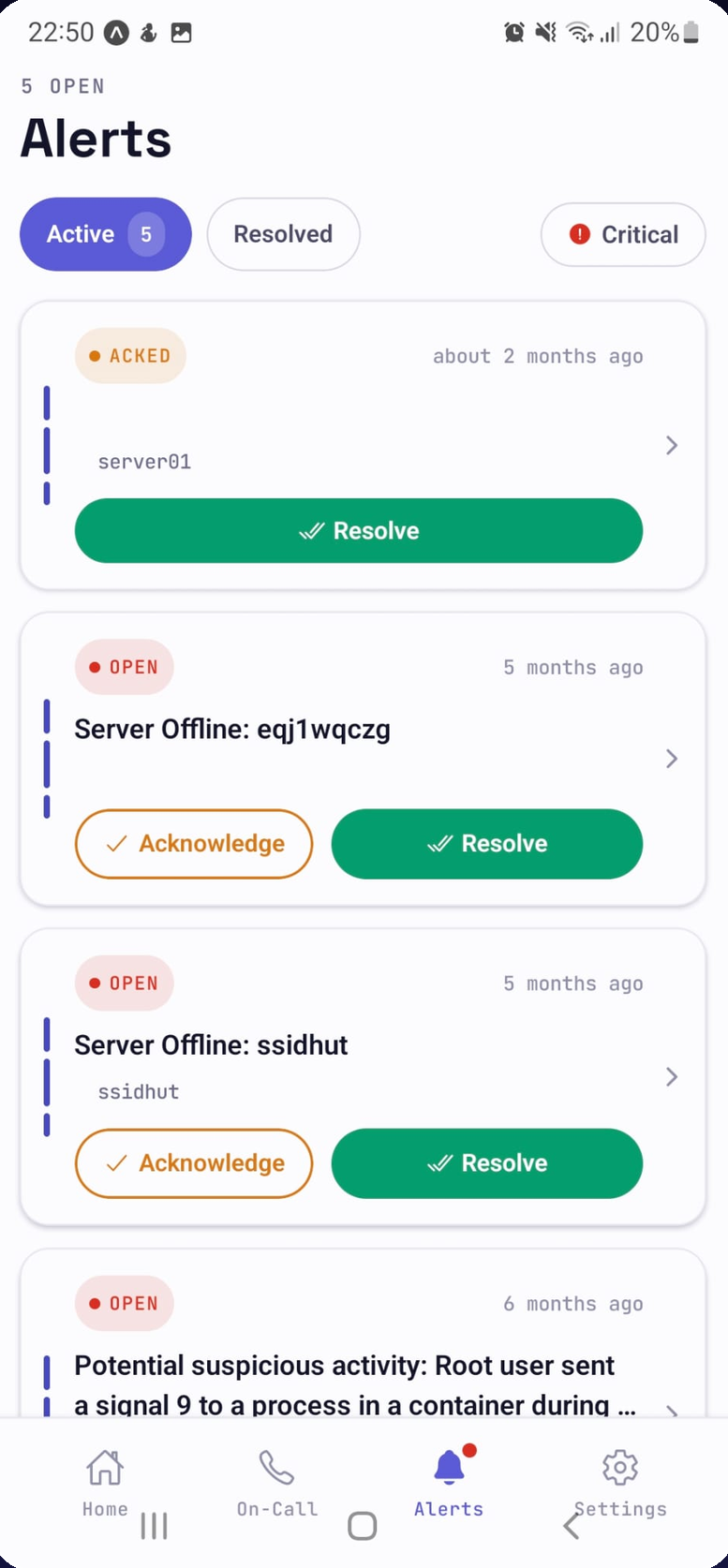
The same incident reaches Slack, Telegram, WhatsApp, email, and SMS, and the mobile app pages you directly - then lets you acknowledge or resolve without opening a laptop. Acknowledging anywhere stops the escalation everywhere.

# infra-alerts
Slack messages from AlertKick in an infra-alerts channel: inbound SSH login alerts with status and description
a thread per alert in the channel your team already watches
AlertKick mobile app alerts screen: open and acknowledged alerts with acknowledge and resolve buttons
the mobile app: acknowledge or resolve from bed, and the ladder stops

fewer pages, not more

A rota only works if the pages are worth waking up for.

Alerts are grouped and deduplicated before anyone is paged, and AI reads each one in context to decide whether it is worth an interruption. Three web servers spiking behind one load balancer is one page, not three.

89,959

events observed on one customer fleet

27

alerts a human was asked to read

1 : 3,300

interruptions to events

"What we needed was not more visibility - it was fewer, better interruptions. Twenty-seven alerts in three months from ninety thousand events is the difference between a team that reads its notifications and a team that has learned to ignore them."

the same agent, one layer down

It can also be the thing that raises the alert.

Install the agent and AlertKick stops being only an on-call tool. It watches your servers from inside the kernel with eBPF - intrusions, SSH logins, rootkits, crypto miners, file changes - and feeds the same rosters and escalation policies you just built.

detect

Kernel-level eBPF detection mapped to MITRE ATT&CK, with AI explaining each event in plain English.

watch

Uptime, response times, SSL and domain expiry, cron heartbeats, CPU, memory, disk, and containers.

attribute

Every SSH session, command, and file change tied to who did it - human, pipeline, or AI agent.

See eBPF security monitoring

pick a part, see what it does

Nine products. One agent watching all of it.

On-call is where most teams start. Everything else comes on the same plan, so this is what you get on day one, not a roadmap.

The rota lives here, not in a spreadsheet.

Build a rotation once - daily, weekly, bi-weekly, or custom - and it keeps turning. The schedule is always visible, so nobody has to guess who is on call tonight.

  • Daily, weekly, bi-weekly, or custom rotations
  • Overrides for holidays, sickness, and swaps
  • A separate roster per team or service
  • Timezone-aware handover times
  • Who is on call now, visible to everyone
  • Off-duty means nobody pages you
roster · daily_oncall on call now: Rio

handover Fri 09:00 · Europe/London

pricing

Priced per server. Never per teammate.

Per-seat on-call tools charge you for every engineer you add to the rotation - which is exactly the wrong incentive. AlertKick's bill tracks your infrastructure, and your whole team is included on every plan.

free

£0

10 uptime monitors and heartbeats, 5-minute checks, alerts to email, Slack, and Telegram. Commercial use allowed.

most teams

professional

£39/mo

On-call rosters and escalation policies, 5 hosts with eBPF security included, 20 checks at 1-minute intervals, 30-day retention.

business

£149/mo

25 hosts, 100 checks, 90-day retention, plus compliance evidence and reports for PCI DSS and SOX.

Questions teams ask before moving on-call

Do you charge per engineer?
No. Plans are flat and priced by infrastructure: Free, £39 a month for 5 hosts, £149 a month for 25 hosts. Your whole team is included on every plan, so adding someone to the rotation never changes the bill.
What happens if nobody acknowledges?
The escalation policy keeps climbing. Each level has its own wait time and its own channel, so an unacknowledged page moves from the primary on-call to the backup, then to a roster or a manager, then to a catch-all. Acknowledging stops the climb immediately.
Can people swap shifts and take holidays?
Yes. Overrides cover a specific date range without touching the underlying rotation - the schedule snaps back afterwards. The roster is always visible, so everyone can see who is on call now and when their turn comes.
Which channels can page someone?
Email, SMS, WhatsApp, Telegram, Slack, and mobile push. You pick the channel per escalation level, so a warning can go to a Slack channel while a critical page hits SMS and mobile push.
Can I keep the monitoring I already have?
Yes. AlertKick accepts alerts from Prometheus Alertmanager, Grafana, Datadog, CloudWatch, Zabbix, Nagios, Icinga2, and a generic webhook. Point your existing alerts at it and use it purely as the on-call and escalation layer.
Does off-duty actually mean off?
Yes. Only the person the roster says is on call for that window gets paged, plus whoever the escalation policy names above them. There is no all-hands channel ping at 3 AM.

Put your rota somewhere it can page people.

Build a roster, attach an escalation policy, and fire a test alert at yourself. Ten minutes, no sales call, and the whole team is included on every plan.

Start free

free plan · no card · commercial use allowed