ebpf security monitoring · one agent

Know the moment a server breaks - or someone breaks in.

One agent installs in about a minute and watches your servers from inside the kernel: intrusions, SSH logins, rootkits, crypto miners, file changes. AI reads every event and pages you only when it matters.

89,959 events on one customer fleet became 27 alerts.
Free plan · no card · commercial use allowed

security events · live triage watching
02:04 sshd: session opened for deploy from 10.0.4.12
02:09 cron.daily: unattended-upgrades installed 3 packages
02:11 docker: healthcheck exec in container web-1
02:14 systemd: logrotate.service completed
Alert · critical T1078

Root SSH login from 203.0.113.7

AI:Source IP is on 2 threat feeds. Nobody on this team logs in from that network, and it is 02:17 on this host. Paging on-call.

filtered as routine today: 3,281 1 page sent

89,959

security events observed on one customer fleet

27

alerts a human was asked to read

1 : 3,300

interruptions to events - how DevSmooth runs on it

the problem

Most teams find out from the wrong place.

outage

A customer email

The load balancer kept returning 200 while checkout was broken behind it. The uptime ping was green the whole time. The customer was not.

intrusion

The cloud bill

A crypto miner ran politely at 60% CPU for five weeks. Uptime never blinked. The first alert was an invoice, and the second was working out how they got in.

breach

A post-mortem

The SSH key added to authorized_keys in March surfaced in an audit in June. auth.log had it the whole time. Nobody was reading auth.log. Nobody ever is.

Three different stories, one failure: nothing was watching from inside the box. A ping from outside can tell you the site answered. It cannot tell you who logged in, what changed, or what is quietly eating the CPU.

the fix, in ten minutes

Install it, SSH in, watch yourself get caught.

No demo to book, no sales call. This is the actual first-run experience, end to end.

step 1

Run one command

Add a server in the dashboard and it generates the install line for you:

curl -sSL 'https://app.alertkick.com/...' | sh

step 2

Watch it come online

Within about 30 seconds the host appears: CPU, memory, disk, processes, containers, and kernel-level security events. No config written.

step 3

Get caught on purpose

SSH into the box and watch your own login arrive as a security event, explained in plain English. That is the product, working before your coffee cools.

Here's what step 3 looks like.

The SSH login you just made, explained and delivered where your team already works. From there it follows your on-call roster and escalation policy until somebody acknowledges it.

# infra-alerts
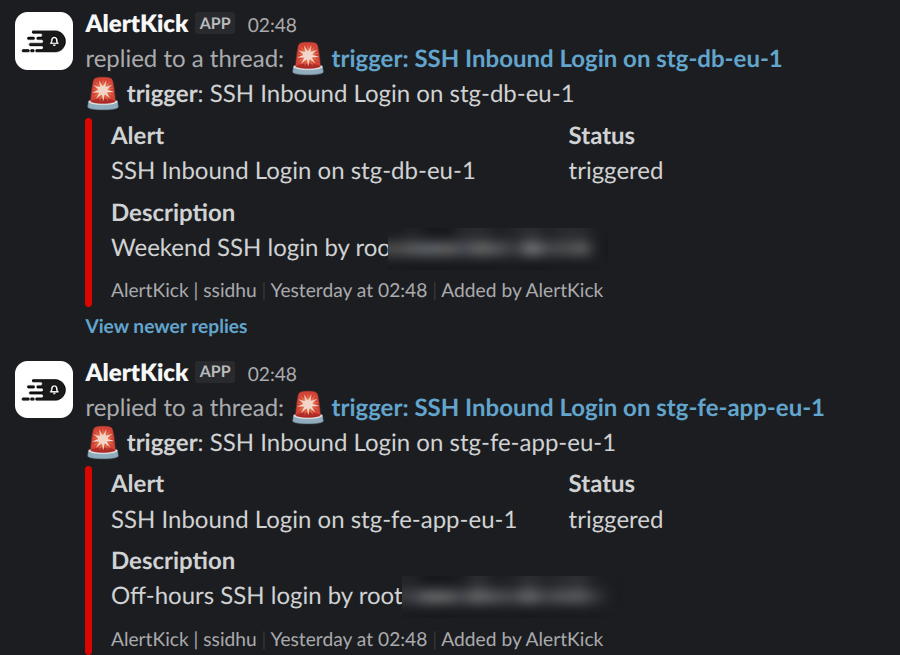
Slack messages from AlertKick in an infra-alerts channel: SSH inbound login alerts with status and description
the SSH logins from step 3, arriving in Slack with a thread per alert - see how paging and escalation work
Start free

what one agent replaces

Six tools' worth of watching. One agent, one bill.

Every plan includes all of it - these are capabilities, not add-ons.

the part nobody else covers

Your newest operator is an AI. Who's watching it?

CI pipelines and AI agents now SSH into production, edit configs, and run deploys. In the auth log they look exactly like you. AlertKick gives every change - human or machine - the same three checks:

attributed

Who did it - which human, which pipeline, which agent - captured at the kernel, not guessed from a shared deploy user.

authorized

Was it supposed to happen now? Maintenance windows lock SSH on the host outside approved times - for everyone.

verified

Did what changed match what was declared? File changes diffed against the plan and scanned before the window closes.

See how change tracking works

from a customer running production on it

"What we needed was not more visibility - it was fewer, better interruptions. Twenty-seven alerts in three months from ninety thousand events is the difference between a team that reads its notifications and a team that has learned to ignore them."

go deeper

The screenshots, the rules, the coverage.

Everything above is one agent. Here is what the security side actually looks like in the product.

pricing

Priced per server. Never per teammate.

Per-seat security tools charge you for every engineer you add. AlertKick's bill tracks your infrastructure, and your whole team is included on every plan.

free

£0

10 uptime monitors and heartbeats, 5-minute checks, alerts to email, Slack, and Telegram. Commercial use allowed.

most teams

professional

£39/mo

5 hosts with eBPF security included, 20 checks at 1-minute intervals, 30-day retention, on-call and escalation.

business

£149/mo

25 hosts, 100 checks, 90-day retention, plus compliance evidence and reports for PCI DSS and SOX.

Questions teams ask before installing

How long does setup actually take?
One command per server. Add a host in the dashboard, paste the generated curl line into a shell, and the server appears with metrics and security events in about 30 seconds. No config files to write.
Will the agent slow my servers down?
No. Detection runs via eBPF at the kernel - no kernel modules, no log shipping pipeline, no noticeable overhead. It is designed to run on everything from production databases to a Raspberry Pi.
What does eBPF actually see?
System calls, as they happen: SSH sessions, spawned processes, opened listening ports, file changes, container shells. Detection rules map to MITRE ATT&CK techniques, and AI reads each event in context before anything reaches a human.
Does this replace a SIEM?
For a small team, usually yes - it replaces a host intrusion detection tool and the log pipeline you would otherwise build to feed one. Events are collected, triaged, and retained with evidence attached, without a query language to learn.
Does it work with AI agents operating servers?
Yes - that is the point of change tracking. Every SSH session, command, and file change is attributed to who did it (human, pipeline, or AI agent), checked against maintenance windows, and verified after the fact. An open-source MCP server lets your AI tools query and act on alerts.
How is pricing different from per-seat tools?
Plans are flat: Free, £39 a month for 5 hosts, £149 a month for 25 hosts. Your whole team is included on every plan - adding an engineer never changes the bill.

Put a watcher on one server today.

Install the agent on a test host, SSH in, and watch your own login arrive - explained - before your coffee cools. If it earns your trust, roll it out.

Start free

free plan · no card · commercial use allowed